Download these before your flight. You’ll thank yourself the moment you land.
Most travelers arrive in Korea with Google Maps and a translation app — and immediately run into problems. Google Maps gives incomplete transit directions. Taxis don’t show up where the app says. Nobody around you speaks enough English to help.
These five apps fix all of that. Install them before you board your flight, not after you land, because setup requires a stable internet connection.
1. Naver Map — Your Primary Navigation App in Korea
📱 Google Play | App Store
There have been recent reports that South Korea may begin sharing map data with Google. Whether this will make Google Maps fully reliable in Korea remains to be seen. For now, Naver Map is the safest and most accurate choice for getting around.
Naver Map runs on local data and is what everyone in Korea actually uses. It covers subway routes, bus lines, walking directions, and real-time transit updates. Searching in English works well for major landmarks, subway stations, and most restaurants.
How to switch to English:
- Open Naver Map
- Tap the menu icon in the top
- Tap the settings (⚙️) icon
- Tap the language option (shown as “한국어” by default)
- Select English
- Tap confirm and restart the app
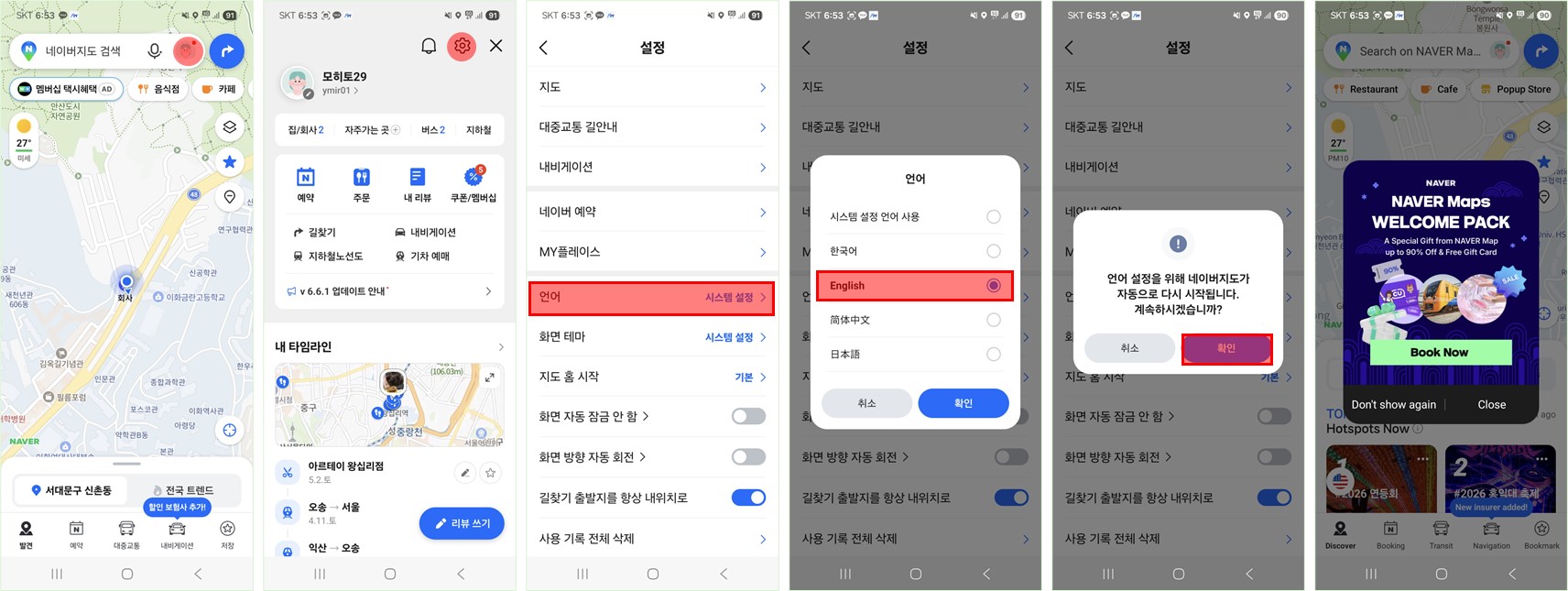
Once restarted, menus and major place names will appear in English.
💡 Korean tip: Some restaurant and café names may not come up easily in English search. When I post food recommendations on this blog, I’ll always include the Korean name alongside the English — just copy and paste it directly into Naver Map for accurate results.
2. Kakao T — The Only Taxi App You Need
📱 Google Play | App Store
Kakao T is Korea’s dominant ride-hailing app. Enter your destination, get matched with a nearby driver, and pay by card through the app. The fare is metered and transparent — no risk of being overcharged.
The biggest advantage for foreign travelers: you type your destination in English, and the driver sees it in Korean on their end. No language barrier, no need to communicate the address out loud.
If you’re traveling in a group, try Kakao Venti — a van service available within the app. It’s especially convenient for airport transfers (airport → hotel, hotel → airport) when you have multiple people and plenty of luggage.
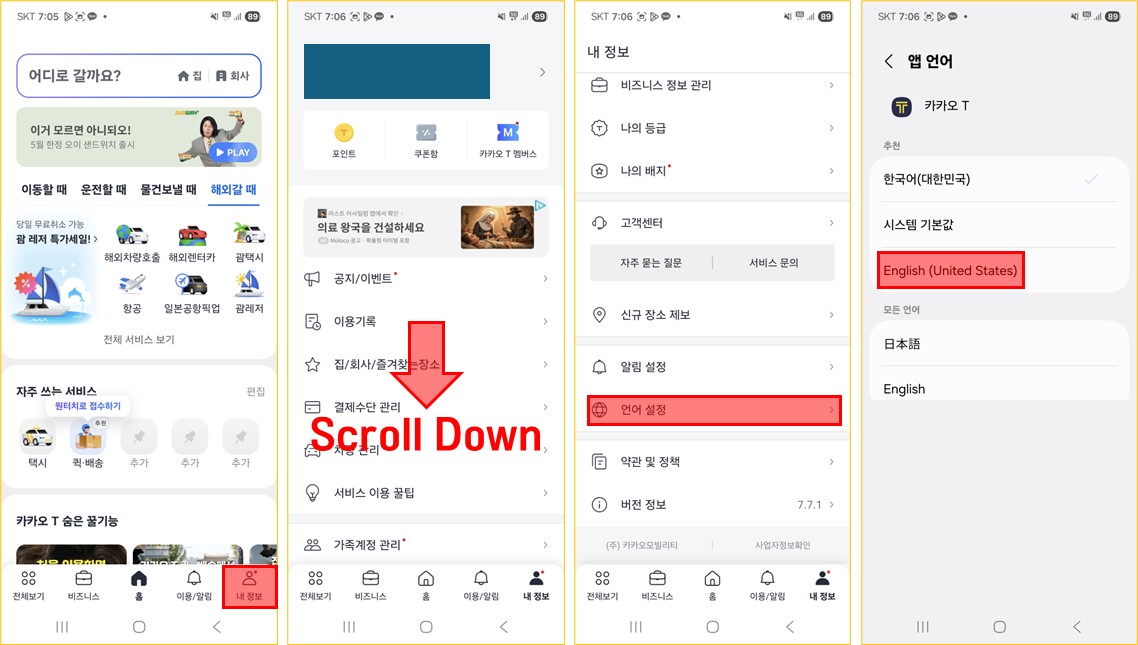
The app follows your device’s system language. If it opens in Korean, go to Settings → Language and select English.
⚠️ Important: Kakao T requires mobile data to work. Make sure your eSIM or SIM card is active before you try to use it.
Incheon Airport has a dedicated Kakao T pickup zone. Since the exact location varies by terminal, set “Incheon Airport” as your pickup point in the app and it will automatically guide you to the nearest pickup spot.
3. Papago — Better Than Google Translate for Korean
📱 Google Play | App Store
Google Translate handles Korean. Papago handles it better. The difference shows up in real situations — restaurant menus, street signs, conversations — where Google Translate often produces awkward or inaccurate results.
Key features:
- Text translation (type or paste)
- Camera translation — point your phone at any Korean text and it translates in real time
- Voice translation — speak and it translates both directions
- Conversation mode — useful for communicating with shopkeepers or restaurant staff
How to use camera translation:
- Open Papago
- Tap the camera icon
- Point at any Korean text
- The translation appears overlaid on the screen instantly

(Though the translation can be a bit off at times… “mainstream” being translated as “alcoholic beverages” is a good example. Use your best judgment when the translation seems odd, or try the voice translation feature instead.)
💡 Korean tip: Download the offline language pack before you leave home — it means Papago works even without mobile data. Here’s how:
- Open Papago and select English at the top
- Go to Offline Translation
- Download both English → Korean and Korean → English
(Note: The screenshots below are in Korean since the language switch isn’t available on my device — but the steps are the same regardless of your language setting.)
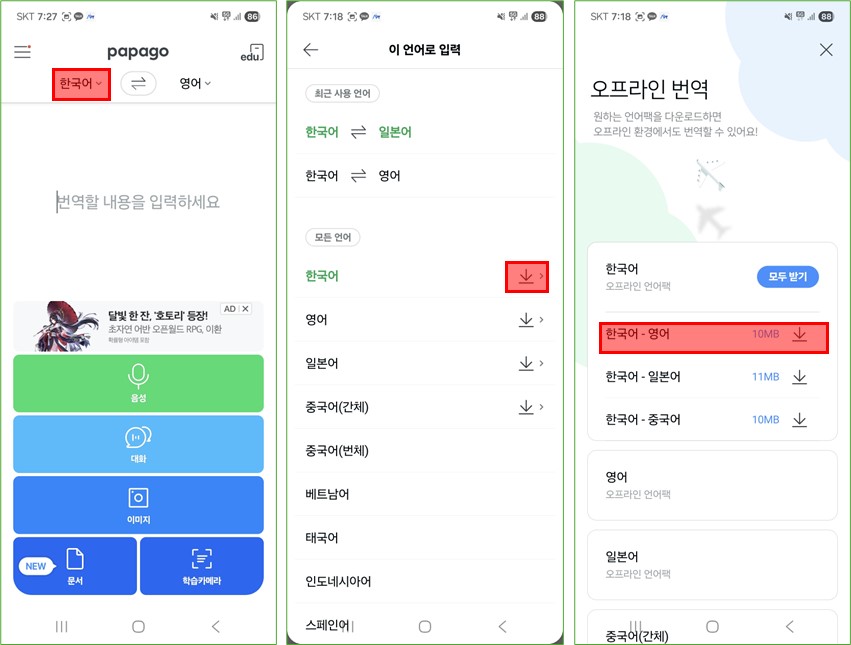
Once downloaded, the camera translation and text translation features work without any internet connection — incredibly useful the moment you land before your SIM or eSIM is active.
💡 Korean tip: This is the feature that makes the biggest difference at restaurants with no English menu. Point, translate, order. Done.
4. KakaoTalk — How Koreans Communicate
📱 Google Play | App Store
KakaoTalk is used by virtually everyone in South Korea. Businesses, restaurants, hotels, and individuals all communicate through it. If a Korean friend, tour guide, or accommodation host wants to reach you, this is how they’ll do it.
As a traveler, you’ll use it to:
- Stay in touch with any Korean contacts
- Communicate with accommodation hosts
- Receive booking confirmations from local services that use KakaoTalk instead of email
The app follows your device’s system language. If it opens in Korean, go to Settings → Language and select English.
[Screenshot: KakaoTalk home screen in English]
5. XE Currency — Real-Time Exchange Rates
📱 Google Play | App Store
XE Currency gives you live exchange rates and lets you convert any amount instantly. Use it any time you’re comparing prices, withdrawing cash, or checking whether an exchange booth is giving you a fair rate.
How to use it:
- Set your home currency (USD, GBP, AUD, etc.)
- Set the second currency to KRW (Korean Won)
- Type any amount and it converts instantly
[Screenshot: conversion screen]
The app follows your device’s system language. If it opens in Korean, go to Settings → Language and select English.
💡 Korean tip: Airport exchange rates are slightly worse than what you’ll find in the city. Check the current rate on XE, then exchange just enough at the airport to cover your first taxi or meal. For the rest, Myeongdong’s currency exchange street offers significantly better rates — or use a WOWPASS machine.
The Short Version
| App | What It Does | Priority |
|---|---|---|
| Naver Map | Navigation & transit | Essential |
| Kakao T | Taxi hailing | Essential |
| Papago | Translation | Essential |
| KakaoTalk | Messaging | Recommended |
| XE Currency | Exchange rates | Recommended |
Download all five before you board. Setup takes about ten minutes total and saves you hours of confusion once you land.
Related: Incheon Airport to Seoul: 4 Ways Compared — figure out how you’re getting into the city first.